[ English | русский | Indonesia ]
Пример настройки Ceph в рабочем окружении
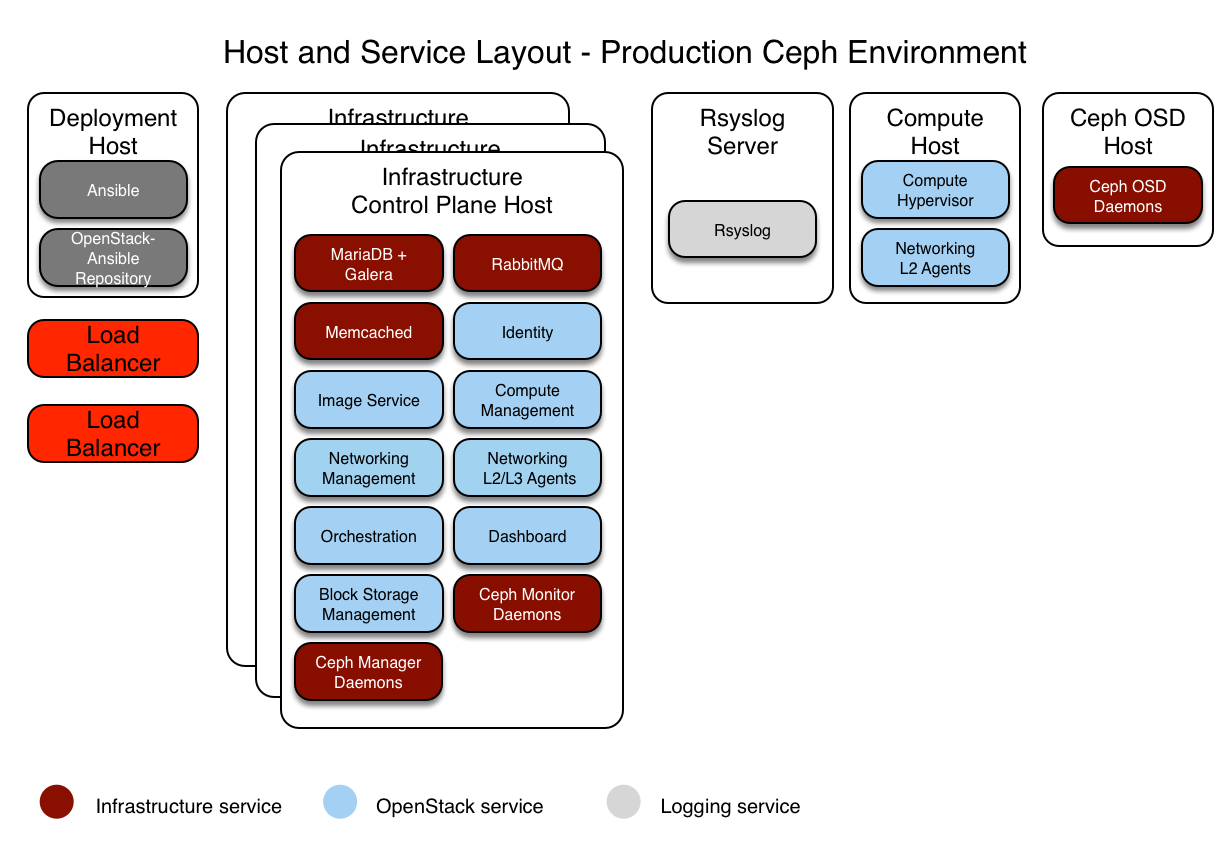
В данной секции описывается пример готового к эксплуатации окружения для рабочего развертывания OpenStack-Ansible (OSA) с высокодоступными сервисами и использованием Ceph хранилища для образов, дисков и инстансов.
Данное иллюстративное окружение имеет следующие характеристики:
Три хоста инфраструктуры (control plane) с контейнерами
ceph_monДва хоста под вычислительные ресурсы
Три хоста под хранилище Ceph OSD
Один хост для сбора логов
Несколько сетевых карт (NIC), настроенных как агрегированные для каждого хоста
Полный набор вычислительных служб с сервисом Telemetry (ceilometer), с настроенным Ceph, как хранилище для службы образов (glance) и блочного хранилища (cinder)
Доступ в Интернет через адрес маршрутизатора 172.29.236.1 в сети управления
Интеграция с Ceph
OpenStack-Ansible позволяет интегрировать кластер Ceph 3-мя различными способами:
подключение к вашему собственному предварительно развернутому кластеру ceph путем указания его информации в
user_variables.ymlи разрешение OpenStack-Ansible подключиться по ssh к мониторам ceph для получения содержимого ceph.conf и связок ключей.Этот метод требует лишь очень небольшого количества настроек в
user_variables.ymlдля указания на внешние мониторы кластера ceph. Вся конфигурация для ceph-ansible будет находиться вне развертывания OpenStack-Ansible, и не будет никакого дублирования. Переменнаяceph_monsожидает список IP-адресов для мониторов ceph во внешнем развертывании:
Примечание
Переопределение ceph_mons требуется только в том случае, если вы используете внешний кластер, которого нет в inventory OpenStack-Ansible (т. е. группа mon_group_name не определена).
ceph_mons:
    - 172.29.244.151
    - 172.29.244.152
    - 172.29.244.153
подключение к вашему собственному предварительно развернутому кластеру ceph путем указания его мониторов в
user_variables.yml, как указано выше, и предоставление данных для заполнения файлов ceph.conf и ceph keyring на хосте развертывания. Это описано здесь. Доступ OpenStack-Ansible по ssh к кластеру ceph не требуется.развертывание кластера Ceph в рамках развертывания OpenStack-Ansible осуществляется с использованием ролей, поддерживаемых проектом Ceph-Ansible. Операторы могут включить плейбук
openstack.osa.ceph_install, добавив хосты в группыceph_mon_hostsиceph_osd_hostsв файлеopenstack_user_config.yml. Для включения плейбукаopenstack.osa.ceph_rgw_installнеобходимо добавитьceph_rgw_hostsв файлopenstack_user_config.yml.
Примечание
Обратите внимание, что установку RGW следует выполнять после развертывания сервиса Keystone.
После определения групп можно приступить к настройке специфичных для Ceph-Ansible переменных в файле OpenStack-Ansible user_variables.yml.
Предупреждение
Развертывание кластера ceph как части OpenStack-Ansible не рекомендуется, поскольку путь обновления ceph-ansible не тестировался и не поддерживается. Этот вариант в основном используется для развертываний CI и AIO для тестирования и демонстрации примера интеграции программного стека.
Данный пример фокусируется на развертывании как OpenStack-Ansible, так и его Ceph кластера.
Настройка сети
Распределение сетевых CIDR/VLAN
Следующие CIDR и VLAN назначения используются для данного окружения.
Сеть |
CIDR |
VLAN |
|---|---|---|
Управляющая сеть |
172.29.236.0/22 |
10 |
Туннелированная (VXLAN) сеть |
172.29.240.0/22 |
30 |
Сеть хранилища данных |
172.29.244.0/22 |
20 |
Назначения IP
Следующие имена хостов и IP адреса используются для данного окружения.
Имя сервера |
Управляющий IP |
Туннелированный (VXLAN) IP |
IP хранилища |
|---|---|---|---|
lb_vip_address |
172.29.236.9 |
||
infra1 |
172.29.236.11 |
172.29.240.11 |
|
infra2 |
172.29.236.12 |
172.29.240.12 |
|
infra3 |
172.29.236.13 |
172.29.240.13 |
|
log1 |
172.29.236.14 |
||
compute1 |
172.29.236.16 |
172.29.240.16 |
172.29.244.16 |
compute2 |
172.29.236.17 |
172.29.240.17 |
172.29.244.17 |
osd1 |
172.29.236.18 |
172.29.244.18 |
|
osd2 |
172.29.236.19 |
172.29.244.19 |
|
osd3 |
172.29.236.20 |
172.29.244.20 |
Настройка сети сервера
На каждом сервере должны быть настроены корректные сетевые мосты. Ниже мы приводим файл /etc/network/interfaces для infra1.
Примечание
Если в вашем окружении нет интерфейса eth0, но вместо него используется p1p1, либо же какое-нибудь другое имя интерфейса, убедитесь, что все отсылки к eth0 в конфигурационных файлах заменены на подходящее имя. Это же применимо ко всем дополнительным сетевым интерфейсам.
# This is a multi-NIC bonded configuration to implement the required bridges
# for OpenStack-Ansible. This illustrates the configuration of the first
# Infrastructure host and the IP addresses assigned should be adapted
# for implementation on the other hosts.
#
# After implementing this configuration, the host will need to be
# rebooted.

# Assuming that eth0/1 and eth2/3 are dual port NIC's we pair
# eth0 with eth2 and eth1 with eth3 for increased resiliency
# in the case of one interface card failing.
auto eth0
iface eth0 inet manual
    bond-master bond0
    bond-primary eth0

auto eth1
iface eth1 inet manual
    bond-master bond1
    bond-primary eth1

auto eth2
iface eth2 inet manual
    bond-master bond0

auto eth3
iface eth3 inet manual
    bond-master bond1

# Create a bonded interface. Note that the "bond-slaves" is set to none. This
# is because the bond-master has already been set in the raw interfaces for
# the new bond0.
auto bond0
iface bond0 inet manual
    bond-slaves none
    bond-mode active-backup
    bond-miimon 100
    bond-downdelay 200
    bond-updelay 200

# This bond will carry VLAN and VXLAN traffic to ensure isolation from
# control plane traffic on bond0.
auto bond1
iface bond1 inet manual
    bond-slaves none
    bond-mode active-backup
    bond-miimon 100
    bond-downdelay 250
    bond-updelay 250

# Container/Host management VLAN interface
auto bond0.10
iface bond0.10 inet manual
    vlan-raw-device bond0

# OpenStack Networking VXLAN (tunnel/overlay) VLAN interface
auto bond1.30
iface bond1.30 inet manual
    vlan-raw-device bond1

# Storage network VLAN interface (optional)
auto bond0.20
iface bond0.20 inet manual
    vlan-raw-device bond0

# Container/Host management bridge
auto br-mgmt
iface br-mgmt inet static
    bridge_stp off
    bridge_waitport 0
    bridge_fd 0
    bridge_ports bond0.10
    address 172.29.236.11
    netmask 255.255.252.0
    gateway 172.29.236.1
    dns-nameservers 8.8.8.8 8.8.4.4

# OpenStack Networking VXLAN (tunnel/overlay) bridge
#
# The COMPUTE, NETWORK and INFRA nodes must have an IP address
# on this bridge.
#

auto br-vxlan
iface br-vxlan inet static
    bridge_stp off
    bridge_waitport 0
    bridge_fd 0
    bridge_ports bond1.30
    address 172.29.240.16
    netmask 255.255.252.0

# OpenStack Networking VLAN bridge
auto br-vlan
iface br-vlan inet manual
    bridge_stp off
    bridge_waitport 0
    bridge_fd 0
    bridge_ports bond1

# compute1 Network VLAN bridge
#auto br-vlan
#iface br-vlan inet manual
#    bridge_stp off
#    bridge_waitport 0
#    bridge_fd 0
#
# For tenant vlan support, create a veth pair to be used when the neutron
# agent is not containerized on the compute hosts. 'eth12' is the value used on
# the host_bind_override parameter of the br-vlan network section of the
# openstack_user_config example file. The veth peer name must match the value
# specified on the host_bind_override parameter.
#
# When the neutron agent is containerized it will use the container_interface
# value of the br-vlan network, which is also the same 'eth12' value.
#
# Create veth pair, do not abort if already exists
#    pre-up ip link add br-vlan-veth type veth peer name eth12 || true
# Set both ends UP
#    pre-up ip link set br-vlan-veth up
#    pre-up ip link set eth12 up
# Delete veth pair on DOWN
#    post-down ip link del br-vlan-veth || true
#    bridge_ports bond1 br-vlan-veth

# Storage bridge (optional)
#
# Only the COMPUTE and STORAGE nodes must have an IP address
# on this bridge. When used by infrastructure nodes, the
# IP addresses are assigned to containers which use this
# bridge.
#
auto br-storage
iface br-storage inet manual
    bridge_stp off
    bridge_waitport 0
    bridge_fd 0
    bridge_ports bond0.20

# compute1 Storage bridge
#auto br-storage
#iface br-storage inet static
#    bridge_stp off
#    bridge_waitport 0
#    bridge_fd 0
#    bridge_ports bond0.20
#    address 172.29.244.16
#    netmask 255.255.252.0
Настройка развертывания
Настройка окружения
Файл /etc/openstack_deploy/openstack_user_config.yml определяет, как будет выглядеть окружение.
Следующая настройка описывает устройство данного окружения.
---
cidr_networks: &cidr_networks
  management: 172.29.236.0/22
  tunnel: 172.29.240.0/22
  storage: 172.29.244.0/22

used_ips:
  - "172.29.236.1,172.29.236.50"
  - "172.29.240.1,172.29.240.50"
  - "172.29.244.1,172.29.244.50"
  - "172.29.248.1,172.29.248.50"

global_overrides:
  cidr_networks: *cidr_networks
  internal_lb_vip_address: 172.29.236.9
  #
  # The below domain name must resolve to an IP address
  # in the CIDR specified in haproxy_keepalived_external_vip_cidr.
  # If using different protocols (https/http) for the public/internal
  # endpoints the two addresses must be different.
  #
  external_lb_vip_address: openstack.example.com
  management_bridge: "br-mgmt"
  provider_networks:
    - network:
        container_bridge: "br-mgmt"
        container_type: "veth"
        container_interface: "eth1"
        ip_from_q: "management"
        type: "raw"
        group_binds:
          - all_containers
          - hosts
        is_management_address: true
    - network:
        container_bridge: "br-vxlan"
        container_type: "veth"
        container_interface: "eth10"
        ip_from_q: "tunnel"
        type: "vxlan"
        range: "1:1000"
        net_name: "vxlan"
        group_binds:
          - neutron_openvswitch_agent
    - network:
        container_bridge: "br-vlan"
        container_type: "veth"
        container_interface: "eth12"
        host_bind_override: "eth12"
        type: "flat"
        net_name: "physnet1"
        group_binds:
          - neutron_openvswitch_agent
    - network:
        container_bridge: "br-vlan"
        container_type: "veth"
        container_interface: "eth11"
        type: "vlan"
        range: "101:200,301:400"
        net_name: "physnet2"
        group_binds:
          - neutron_openvswitch_agent
    - network:
        container_bridge: "br-storage"
        container_type: "veth"
        container_interface: "eth2"
        ip_from_q: "storage"
        type: "raw"
        group_binds:
          - glance_api
          - cinder_api
          - cinder_volume
          - manila_share
          - nova_compute
          - ceph_mon
          - ceph_osd

###
### Infrastructure
###

_infrastructure_hosts: &infrastructure_hosts
  infra1:
    ip: 172.29.236.11
  infra2:
    ip: 172.29.236.12
  infra3:
    ip: 172.29.236.13

# nova hypervisors
compute_hosts: &compute_hosts
  compute1:
    ip: 172.29.236.16
  compute2:
    ip: 172.29.236.17

ceph_osd_hosts:
  osd1:
    ip: 172.29.236.18
  osd2:
    ip: 172.29.236.19
  osd3:
    ip: 172.29.236.20

# galera, memcache, rabbitmq, utility
shared_infra_hosts: *infrastructure_hosts

# zookeeper
coordination_hosts: *infrastructure_hosts

# ceph_mon containers
ceph_mon_hosts: *infrastructure_hosts

# ceph_mds containers
ceph_mds_hosts: *infrastructure_hosts

# ganesha-nfs hosts
ceph_nfs_hosts: *infrastructure_hosts

# repository (apt cache, python packages, etc)
repo_infra_hosts: *infrastructure_hosts

# load balancer
# Ideally the load balancer should not use the Infrastructure hosts.
# Dedicated hardware is best for improved performance and security.
load_balancer_hosts: *infrastructure_hosts

###
### OpenStack
###

# keystone
identity_hosts: *infrastructure_hosts

# cinder api services
storage_infra_hosts: *infrastructure_hosts

# cinder volume hosts (Ceph RBD-backed)
storage_hosts: *infrastructure_hosts

# glance
image_hosts: *infrastructure_hosts

# placement
placement_infra_hosts: *infrastructure_hosts

# nova api, conductor, etc services
compute_infra_hosts: *infrastructure_hosts

# heat
orchestration_hosts: *infrastructure_hosts

# horizon
dashboard_hosts: *infrastructure_hosts

# neutron server, agents (L3, etc)
network_hosts: *infrastructure_hosts

# ceilometer (telemetry data collection)
metering_infra_hosts: *infrastructure_hosts

# aodh (telemetry alarm service)
metering_alarm_hosts: *infrastructure_hosts

# gnocchi (telemetry metrics storage)
metrics_hosts: *infrastructure_hosts

# manila (share service)
manila_infra_hosts: *infrastructure_hosts
manila_data_hosts: *infrastructure_hosts

# ceilometer compute agent (telemetry data collection)
metering_compute_hosts: *compute_hosts
Индивидуальная настройка окружения
Опционально размещаемые файлы в /etc/openstack_deploy/env.d позволяют модифицировать группы Ansible. Это позволяет оператору задать, будут ли сервисы запущены в контейнере (по умолчанию), либо же на сервере (без контейнера).
Для ceph окружения, вы можете запускать cinder-volume в контейнере. Что бы сделать это, вам нужно создать файл /etc/openstack_deploy/env.d/cinder.yml со следующим содержанием:
---
# This file contains an example to show how to set
# the cinder-volume service to run in a container.
#
# Important note:
# When using LVM or any iSCSI-based cinder backends, such as NetApp with
# iSCSI protocol, the cinder-volume service *must* run on metal.
# Reference: https://bugs.launchpad.net/ubuntu/+source/lxc/+bug/1226855

container_skel:
  cinder_volumes_container:
    properties:
      is_metal: false
Пользовательские переменные
В файле /etc/openstack_deploy/user_variables.yml расположены глобальные переопределения стандартных переменных.
Для этого примера среды мы настраиваем балансировщик нагрузки HA. Мы реализуем балансировщик нагрузки (HAProxy) с уровнем HA (Keepalived) на хостах инфраструктуры. Ваш /etc/openstack_deploy/user_variables.yml должен иметь следующее содержимое для настройки HAProxy, Keepalived и Ceph:
---
# Because we have three haproxy nodes, we need
# to one active LB IP, and we use keepalived for that.
# These variables must be defined when external_lb_vip_address or
# internal_lb_vip_address is set to FQDN.
## Load Balancer Configuration (haproxy/keepalived)
haproxy_keepalived_external_vip_cidr: "<external_ip_address>/<netmask>"
haproxy_keepalived_internal_vip_cidr: "172.29.236.9/32"
haproxy_keepalived_external_interface: ens2
haproxy_keepalived_internal_interface: br-mgmt

## Ceph cluster fsid (must be generated before first run)
## Generate a uuid using: python -c 'import uuid; print(str(uuid.uuid4()))'
generate_fsid: false
fsid: 116f14c4-7fe1-40e4-94eb-9240b63de5c1 # Replace with your generated UUID

## ceph-ansible settings
## See https://github.com/ceph/ceph-ansible/tree/master/group_vars for
## additional configuration options available.
monitor_address_block: "{{ cidr_networks.storage }}"
public_network: "{{ cidr_networks.storage }}"
cluster_network: "{{ cidr_networks.storage }}"
journal_size: 10240 # size in MB
# ceph-ansible automatically creates pools & keys for OpenStack services
openstack_config: true
cinder_ceph_client: cinder
glance_ceph_client: glance
glance_default_store: rbd
glance_rbd_store_pool: images
nova_libvirt_images_rbd_pool: vms

cinder_backends:
  rbd_volumes:
    volume_driver: cinder.volume.drivers.rbd.RBDDriver
    rbd_pool: volumes
    rbd_ceph_conf: /etc/ceph/ceph.conf
    rbd_store_chunk_size: 8
    volume_backend_name: rbddriver
    rbd_user: "{{ cinder_ceph_client }}"
    rbd_secret_uuid: "{{ cinder_ceph_client_uuid }}"
    report_discard_supported: true
